
How to integrate Currai with a streaming chatbot
A beginner-friendly guide to connecting a Next.js chatbot to Currai with the Vercel AI SDK, native HTTP capture, conversation sessions, model traces, and MCP tool events.
A chatbot can return a polished answer and still fail the user.
It may misunderstand the goal, search for the wrong information, call a tool
with bad arguments, omit part of a multi-step request, or return an answer that
sounds confident but does not help. A server log might say the request returned
200 OK. A model dashboard might show token usage. Neither tells you whether
the conversation worked.
That gap becomes harder to manage after launch. Users phrase the same intent in hundreds of ways. Model calls stream over time. Tools execute between tokens. Errors can happen before a response begins or after part of it reaches the browser. One visible answer may depend on several hidden operations.
This guide connects a streaming Next.js chatbot to Currai so one user conversation becomes one observable session. It assumes you are new to Currai and explains each boundary before adding code.
By the end, a real chatbot conversation will appear in Currai with:
- a stable session shared by every turn in the conversation;
- a readable user and assistant exchange in User Stories;
- a top-level agent event for each chat turn;
- a nested model event with provider, model, latency, finish reason, and token metadata;
- optional MCP tool events nested beneath the model execution;
- failure evidence that does not break the user's chat request.
What is a streaming chatbot?
A traditional HTTP response arrives when the server has finished all its work. A streaming chatbot sends the answer in small pieces as the model generates it. The user can begin reading before the full response is complete.
In this guide, the browser uses the Vercel AI SDK's useChat hook and sends
messages to a Next.js route. The server uses streamText to call an AI model and
returns a UI message stream.
The same pattern applies to many chat products:
- The browser stores and displays conversation messages.
- A server route authenticates the model request.
- The model streams an answer.
- Optional tools run while the model works.
- The server returns the stream without exposing private API keys.
What is Currai?
Currai is a user-intelligence and agent-quality platform. Your application sends it sessions and structured events. Currai uses that evidence to connect what the user experienced with what the AI system did internally.
For a chatbot, that means product and engineering teams can investigate:
- what users were trying to accomplish;
- which intents appear repeatedly;
- where users rephrase, abandon, or correct the assistant;
- which model and tool operations produced an answer;
- which failures and policy violations are increasing;
- whether a prompt, model, or product change improved real outcomes.
Currai does not replace your model provider, the Vercel AI SDK, or application logs. It adds a conversation-centered record across them. The integration in this guide uses native HTTP, so you do not need to add a Currai SDK dependency.
The architecture
The browser owns chat presentation and a non-secret conversation UUID. The server owns the OpenAI key, Currai credentials, model execution, and event capture.
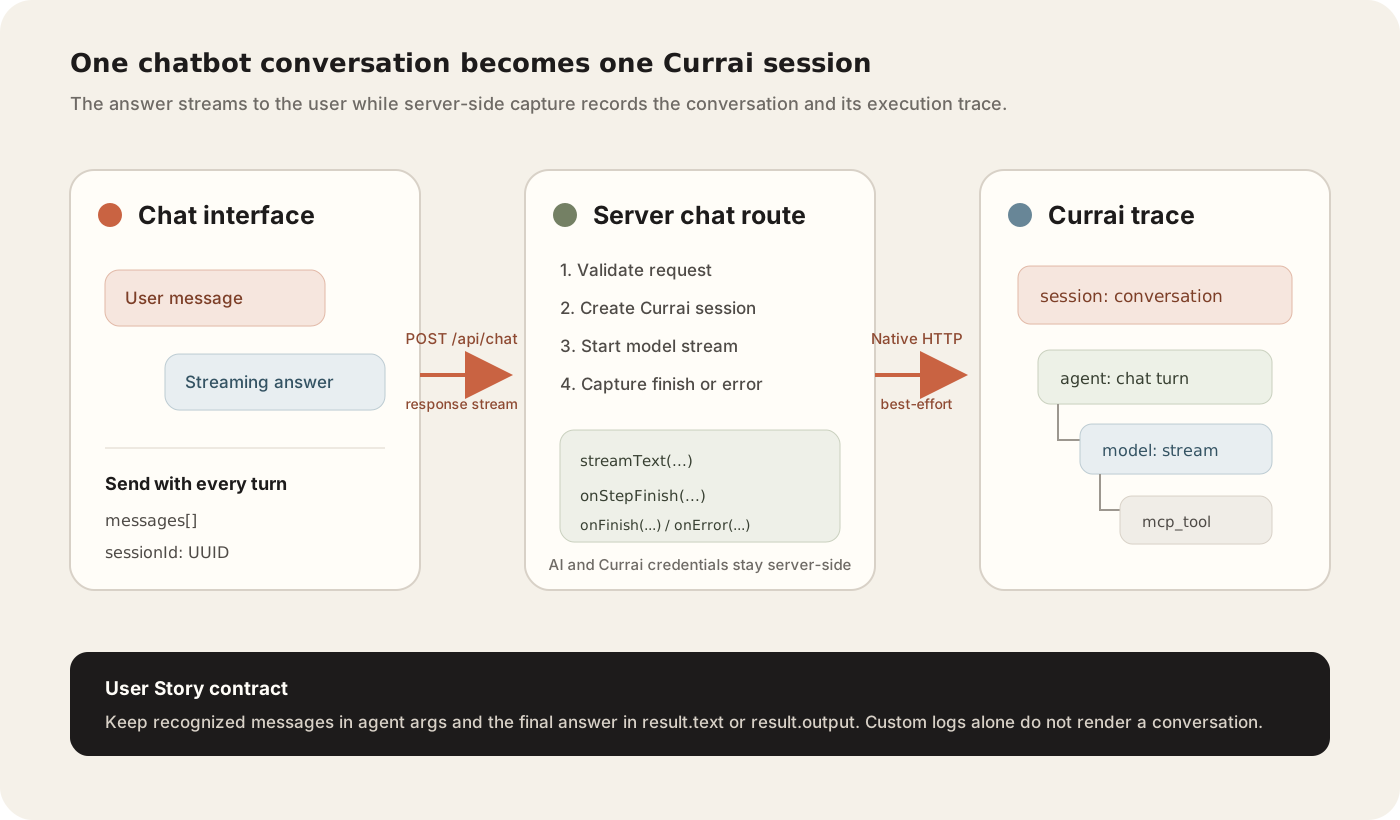
The response stream and the observability path share the same server boundary, but Currai failure never becomes a chatbot failure.
One turn should produce this trace:
The agent event is the readable conversation boundary. The model and tool
events explain how the answer was produced.
What you need
Prepare:
- a Next.js application with a server-side chat route;
- the Vercel AI SDK packages used by your application;
- a server-side model provider key;
- a Currai workspace and ingestion key;
- Node.js and your project's package manager.
This guide uses TypeScript, @ai-sdk/react, @ai-sdk/openai, and AI SDK 5-style
APIs. Adapt the provider import if your chatbot uses another supported model.
The Currai event shape stays the same.
Step 1: Prove the chatbot works first
Run your application before adding capture:
Open the local URL and send a simple message:
Explain retrieval-augmented generation in three sentences.
Confirm the answer streams into the page. If the baseline fails, inspect the model key, server route, request payload, and browser console first. Currai can make a working path observable, but it should not be used to hide an existing chat bug.
Step 2: Add server-only Currai credentials
Create an ingestion key during Currai onboarding or from Workspace Settings → API Keys. Add the values to your server environment:
Keep your provider key in the same trusted environment:
Never add NEXT_PUBLIC_ to a Currai secret or model provider key. Next.js
exposes variables with that prefix to browser code.
Restart the application after changing the environment. A running server does not automatically receive new values.
You can also install the Currai Skill and ask a coding agent to wire the real chat route:
Step 3: Give the browser one stable conversation ID
Currai needs to know which turns belong to the same conversation. Generate one UUID when the conversation begins and send it with every chat request.
One simple AI SDK pattern is to use the first user message ID as the session ID. Configure message IDs as UUIDs, then add that first ID to the request body:
The first user message remains in the history, so later turns reuse its ID. Clearing the browser conversation removes that history. The next first message receives a new UUID and starts a new Currai session.
For an authenticated product, prefer your real privacy-reviewed user ID for
userId, while keeping a separate conversation UUID for sessionId. Do not
derive identity from message text, an authorization token, or an IP address.
Step 4: Validate the chat request on the server
The server route should reject malformed requests before calling the model or Currai:
Production routes should also limit request size, message count, and message length according to the product's expected use. Validation protects both the model request and the observability path.
Step 5: Create a dependency-free Currai helper
Create a server-only module such as lib/currai.ts. It needs two operations:
Authenticate with HTTP Basic auth built from the Currai public and secret keys:
Before serialization, recursively redact object keys matching authorization, cookies, passwords, secrets, API keys, and access or refresh tokens. Capture only the conversation data and metadata you need. Currai observability should follow the same privacy and retention rules as the product itself.
The helper returns a boolean instead of throwing. A capture outage must never turn a valid model response into an error for the user.
Step 6: Create the session before the first event
At the beginning of every server turn, create or confirm the Currai session:
Sending the session again on later turns is safe when the ingestion contract is idempotent for the same session UUID. The important ordering rule is that the session must be accepted before any event refers to it.
If the first attempt fails, keep a small ensureCurraiSession() function that
retries before later finish, tool, or error events. Do not retry forever or
delay the user's stream for a long observability timeout.
Step 7: Allocate event IDs before starting the model
Create stable IDs and start timing immediately before the AI operation:
These IDs define the parent-child trace:
- the agent event has no parent and represents the conversational turn;
- the model event uses
parentId: agentEventId; - each model-invoked tool uses
parentId: modelEventId.
Allocate IDs before the work begins so failures and success describe the same attempt. Tool IDs should be allocated as soon as their input becomes available, not after execution finishes.
Step 8: Capture the completed streamed answer
Call streamText normally. Add capture in lifecycle callbacks without
consuming or replacing the user-facing stream:
onFinish receives the accumulated final text. Capturing there preserves the
normal stream while storing the complete assistant answer once.
Include provider, model, finish reason, usage, route, environment, and release metadata only when the application knows them. Do not guess costs, tokens, or model names.
Step 9: Follow the User Story conversation contract
Currai renders readable conversation messages from recognized fields on
top-level agent events.
For user input, use one of these supported shapes:
args.input;args.prompt;args.message;- supported text content or parts inside
args.messages.
For the assistant response, use:
result.output;result.text;result.response;result.answer.
The streamed chat turn above uses args.messages and result.text. That gives
Currai both sides of the conversation.
Custom properties such as rawTranscript, chatLog, or completionPayload
may appear in the technical trace, but they do not replace recognized
conversation fields. When a top-level agent event exists, Currai will not use a
nested model event to repair missing agent evidence.
This creates a common false positive during integration: the session and model
event appear, but User Stories contains an empty conversation. Fix the
top-level agent args and result; do not add a new backend transcript shape.
Step 10: Capture model failures
Streaming can fail before the first token or after a partial answer. Use the same preallocated event IDs and record both the model and agent boundaries as failed:
Guard this function with a settled boolean so onError and an outer
catch cannot capture the same failure twice. Preserve the chatbot's normal
error response after capture.
Step 11: Add MCP tool events when the chatbot uses tools
MCP, or Model Context Protocol, lets the model call tools exposed by an MCP server. A search-enabled chatbot may call a web search tool and then fetch a source before composing its answer.
For each tool call:
- Allocate an event UUID and timestamp when tool input becomes available.
- Wait for the final tool result, ignoring preliminary results.
- Capture the input, output, success state, and latency.
- Set
kind: "mcp_tool". - Set
parentId: modelEventId. - Include the MCP server, transport, and provider tool-call ID as metadata.
The resulting event resembles:
If the MCP connection itself fails, capture a failed mcp_tool event with the
connection error. The chatbot may continue without tools if that behavior is
safe for the request. Always close per-request MCP clients when the stream
finishes, errors, or is aborted.
Step 12: Verify one real conversation
Run your normal checks:
Restart the app, then send at least two messages in the same browser conversation. If tools are configured, make the second request require one:
What changed in the latest release of this product? Use current sources and include the URLs.
In Currai, verify:
- One session exists for the conversation. Both turns share the same session UUID.
- User Stories renders messages. At least one user or assistant message is visible, not merely an empty story row.
- Each turn has a top-level agent event. The agent contains recognized message input and final text output.
- The model is nested under the agent. Provider metadata, latency, finish reason, and token usage appear when available.
- Tools are nested under the model. Tool input, final output, success, and latency belong to the correct model call.
- A real failure appears in Errors. Test safely in development with an invalid model ID or controlled tool failure, then restore the configuration.
A connectivity event is not enough. Completion requires the real chat route, correct nesting, and a rendered User Story conversation.
Common problems and fixes
Every message creates a new session
The client is generating a session UUID during every request. Create it once per conversation, store it in component state or derive it from the first user message ID, and reuse it until the user starts a new conversation.
Different conversations merge into one session
The session ID is global or persisted longer than the visible conversation. Reset it when the user selects New chat or clears the conversation. A user ID may span many conversations; a session ID should not.
Currai receives events, but User Stories is empty
Inspect the top-level agent event. Put user messages in recognized args
fields and the final assistant answer in result.text or result.output.
Custom log objects and nested model evidence do not replace that contract.
Only part of the assistant answer is captured
Capture in onFinish, which receives the accumulated final text. Do not read
the response stream a second time or capture each token as a separate turn.
The chatbot stops when Currai is unavailable
The capture helper is throwing or waiting too long. Use a short timeout, catch network errors, return a boolean, and preserve the model response independently of capture success.
Tool calls appear beside the model instead of beneath it
Set each tool event's parentId to the current modelEventId. Set the model
event's parentId to the agentEventId.
The same failure appears twice
Both the streaming callback and outer request handler are recording it. Use one
shared settled flag so the first completion or failure wins.
A tool event has no useful latency
Start its timer when tool input becomes available. Creating the timestamp in
onStepFinish measures only the capture request, not tool execution.
Privacy and production checklist
Before deployment, confirm:
- model and Currai secret keys exist only in server code;
- authorization headers, cookies, passwords, tokens, and secrets are redacted;
- message retention matches the product's privacy policy and user consent;
- request sizes and message history are bounded;
- one stable session UUID is used per visible conversation;
- session capture occurs before event capture;
- agent, model, and tool parent IDs preserve the execution tree;
- capture uses short timeouts and cannot fail the chat response;
- failures use
success: falseand contain safe error messages; - provider, model, token, cost, route, release, and environment metadata is included only when known.
What you built
You now have a streaming chatbot whose production conversations can be understood at two levels.
At the user level, Currai can reconstruct the conversation, detect intents and violations, group failures, and show where users struggle. At the execution level, each turn links to the model and tool operations that produced it.
The integration does not change the response stream or add a first-party Currai SDK. It creates a stable conversation UUID in the browser, captures the session first on the server, records final model output in lifecycle callbacks, and preserves the agent → model → tool tree with native HTTP.
For agent-assisted instrumentation, read How to run the Currai Skill. To learn how conversations become production evidence, continue with How to trace a multi-turn chatbot, or start with Currai free.
FAQ
Does Currai replace my model provider dashboard?
No. Provider dashboards explain provider usage. Currai connects those model operations to complete user conversations, intents, failures, violations, and quality outcomes.
Do I need a Currai SDK?
No. This integration uses native authenticated HTTP requests for sessions and events.
Should one message equal one session?
No. One visible multi-turn conversation should normally equal one session. Each user-to-assistant exchange becomes a separate agent event inside it.
Can I capture streaming tokens individually?
You can store token-level details as trace metadata if you have a specific
need, but conversation rendering should use the accumulated final answer from
onFinish.
Are MCP tools required?
No. A model-only chatbot needs only agent and model events. Add mcp_tool
events when the application actually uses MCP tools.
What proves the integration is finished?
One real chatbot conversation must produce a Currai session, correctly nested agent and model events, optional tools under the model, and at least one visible message in User Stories. An empty session or standalone demo event is not enough.